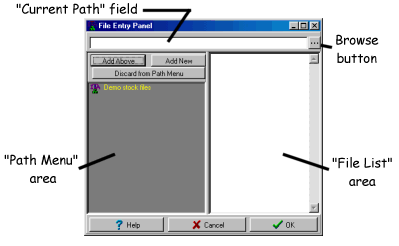
The gray area in the File Entry Panel is what we call the Path
Menu area. This is where you store
the locations of your frequently accessed stock data:
- For ASCII-based stock files, the Path Menu will hold the path to
where those files exist. Typically ASCII (text-based) files have an
extension of ".CSV", so an entry might be: "C:\asciidata\techstocks\*.csv".
- For CSI data, the Path
Menu will hold the exchanges that contain all the stocks you have in
your CSI subscription. For instance, an entry might be: "NYSE".
- For TeleChart TC2007, Insider TA automatically adds the various Watch Lists that
TeleChart makes available to you. You can toggle which chart list
type you want to see by accessing the wizard option (see below).
- For Metastock data,
the Path Menu will store the precise location of Metastock's MASTER,
EMASTER, or XMASTER index files (any one of these files must exist
in any Metastock directory). For instance, an entry for Metastock might
be: "C:\msdata\techstocks\XMASTER".
After adding an entry to the Path Menu, clicking it will display all
the underlying stocks in the File List area.
Wizard Option
For CSI, TeleChart TC2007, and Metastock users,
Insider TA's File Entry Panel has the ability to automatically add entries
to the Path Menu. When you right-click the mouse in the Path
Menu, the following popup will appear:
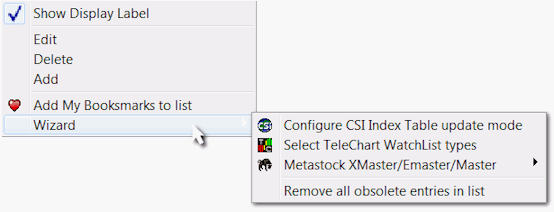
The popup options allow you to maintain what you see in the Path Menu.
The last option labeled "Wizard" has a submenu with an option
to each of the data formats supported.
TeleChart WatchList Types:
TeleChart groups stocks into specialized listings called watchlists.
You can toggle which list type you would like to see in the File Entry
Panel's Path Menu by accessing this menu option.
CSI Symbol Index Table update mode:
CSI data is automatically prepared for you by stock exchange. In order
for this to work, Insider TA makes use of its own CSI Symbol Index
table. Each time you perform a CSI database update through Unfair
Advantage®, there might be the occasional time where some stock symbols
are added, changed, or delisted. This information will eventually need
to be reflected in the CSI Symbol Index table. Clicking this option
in the wizard allows you to set the update mode to either manual or automatic..
Metastock "master" index file scanning:
Loading Metastock data into Insider TA involves locating all the "master" index
files that always resides in any Metastock data directory. The File Entry
Panel scanning wizard will search for all such files in your drive (C:,
D:, etc.), and automatically add all valid entries to the Path Menu.
Remove all obsolete entries in list:
Insider TA illustrates invalid entries in the Path List with a symbol.
In time, any number of folder entries may become outdated, and holding
them in your Path List is no longer necessary. You can use this wizard
option to delete all obsolete entries in one sweep. Please note there
is no "undelete" ability, so be sure you do not want them before
executing this option.
|



