|
Direct access to the TC2000 version 7
is an Insider TA™ Professional feature.
There are two ways to load data from the TC2000 Version 7 database:
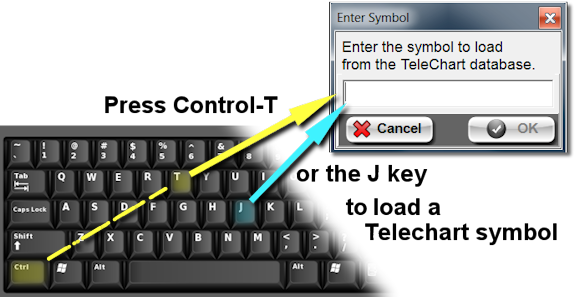
- To load a known symbol, press Ctrl-T (or J) on
your keyboard. A window will pop-up for entering the desired symbol.
Be sure no other Insider TA windows are currently active, otherwise
pressing Ctrl-T or J will not work. You must be at Insider TA's "base
window" in order for these shortcuts to function...
 To
select symbols from your TeleChart Watch Lists, pop up the File
Entry Panel by clicking the "Load Data" button, located
in Insider TA's main window. To
select symbols from your TeleChart Watch Lists, pop up the File
Entry Panel by clicking the "Load Data" button, located
in Insider TA's main window.
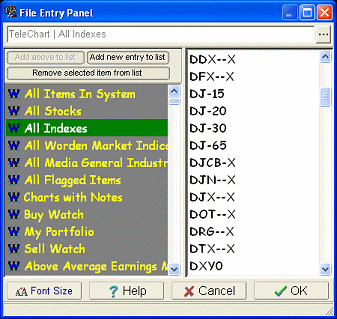
When the File Entry Panel pops
up, you will observe that all the Watch List types that you previously
configured for viewing will be shown in the File Entry Panel's Path
Menu, which is the gray region on the left side...
Configuring Watch List types
for viewing:
TeleChart data can be divided
into any number of Watch Lists (also called Chart Lists). Some
are configured by Worden while others are custom lists that you can
create with your TeleChart software. These lists are divided
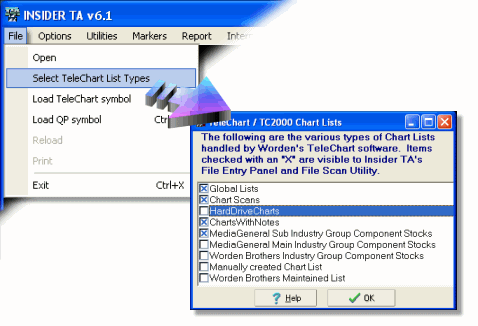
into a number of pre-defined TeleChart categories. You can
configure Insider TA to access any combination of these categories
by pulling down the "File" option in the main menu, then click "Select
TeleChart List Types":
You can also run Insider TA's File
Scan Utility on Watch Lists. Simply select a list from the
File Entry pulldown menu located in the File Scan Utility's Scan-By-Path
List section.
|



